
The TI-30 XS calculator is embedded in all our practice tests but NOT in the lessons and mini-quizzes.
You activate the calculator by clicking the blue button under the title, as seen in the image below. Then, the calculator pops up, and you can use the handler for dragging to put the calculator in a different place on your screen.
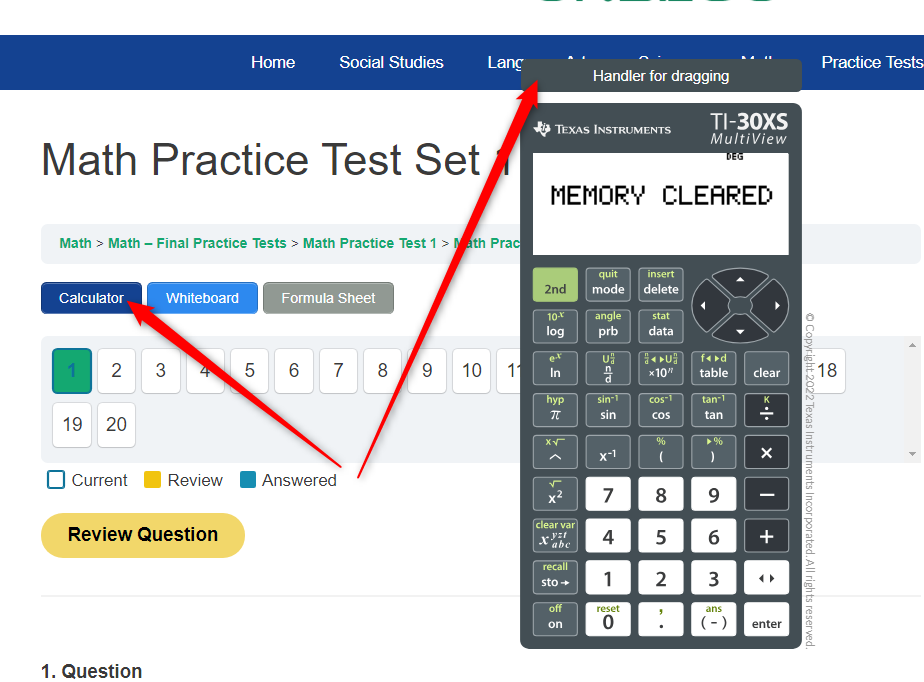
So, if you don’t see the calculator, please ensure your browser allows pop-ups.
The makers of TI-30 XS recommend getting a handheld device to use during Math lessons. Amazon has it for $15.
Feel free to let us know if you need help with this setting in your internet browser, and we can guide you in solving this issue.
Last Updated on January 18, 2026